Changelog
2026-04-21
Improvements
- The Flow run modal now validates date ranges before submission — Smart backfill and time-aware run modes mark the range picker as required, disable the Run button until a valid range is selected, and keep the modal open with inline error details when submission fails
Bug fixes
- Fixed BigQuery-backed Write Components failing with
Response too large to returnwhen exporting large source tables by routing exports through the BigQuery Storage API - Fixed build history picker not highlighting the current build, missing row hover feedback, no return-to-latest option, no URL deep linking for build selection, and adjacent-month calendar days not responding to clicks
- Fixed intermittent authentication and instance resolution failures during Auth0 API rate limits by adding header-aware retries and stale-cache fallback for organization membership reads
2026-04-17
Bug fixes
- Fixed DuckDB Worksheet and Component preview queries leaking connection state between requests by scoping each query to a dedicated cursor that is torn down afterward
- Fixed local DuckLake development failing with
Conflicting lockwhen preview or Worksheet sessions held the DuckDB metadata catalog lock, blocking concurrent Flow run workers from attaching the same metadata file - Fixed Component preview potentially displaying stale data when a build's resource set changed mid-registration due to the build SHA digest being incorrectly memoized by build ID
2026-04-16
Bug fixes
- Fixed Otto messages being silently lost when sent while offline or during a network failure. The send button now disables when offline or session-expired, and failed sends restore the message text and attachments to the input with an error notification.
2026-04-15
Bug fixes
- Fixed full refresh on aliased table Components dropping the referenced table or view instead of skipping the destructive reset, potentially destroying shared objects not owned by Ascend
- Fixed DuckLake metadata catalog sync failing with
DuckDbAttachExceptionon Azure when using inline ABFS configuration due to the ABFS options being wrapped in an incorrect type - Fixed long-running Flow runs failing with
ExpiredTokenExceptionwhen AWS managed-vault secret resolution occurred after the original STS session expired. Vault clients now use botocore refreshable credentials that automatically re-assume the role - Fixed query status polling and cancellation blocking the gRPC event loop, causing unrelated API requests to stall while waiting for query results
2026-04-14
Features
- Non-UTF-8 CSV support: CSV Read Components now support non-UTF-8 file encodings (Windows-1252, UTF-16, UTF-32, UTF-8 BOM) on DuckDB and DuckLake Data Planes via the
parser.csv.encodingconfiguration
Bug fixes
- Fixed Component preview (Records tab) intermittently returning 404 after a build completes due to the runtime caching an empty build snapshot before all component resources were replicated
- Fixed YAML editor features (completion, hover, validation, formatting) not working due to a Monaco 0.53+ API incompatibility with the YAML language worker
2026-04-07
Features
- Otto headless mode: Otto can now be invoked programmatically via SDK, CLI, Automations, or direct API calls without a browser or human in the loop. New
headlessandquery_policyfields on the chat API control query execution —safe(default) auto-runs read-only queries and rejects writes,unsafeauto-approves all queries, andstrictrejects all queries. Browser and user-interaction tools are automatically excluded in headless sessions.
Improvements
- Developer plan Workspaces limit increased from 1 to 2
- API and Otto now use centralized build resolution that consistently falls back to the last successful build across all code paths when the active build is not ready
Bug fixes
- Fixed Otto defaulting to the wrong AI provider on Azure Instances when no explicit default provider is configured, causing API chats and helper Flows to use provider initialization order instead of the managed default. Otto now also refreshes when managed-provider flags change without requiring a restart.
- Fixed BigQuery Worksheet and preview queries failing with
'NoneType' object has no attribute 'lower'when a preview context produced a missingrun_idlabel - Fixed Microsoft SQL Server CDC reads producing duplicate rows when multiple change events for the same primary key share a single polling window, causing Snowflake MERGE to fail with error 100090
Duplicate row detected during DML action - Fixed configurator forms (Flow, Connection, Automation, Fivetran) being marked as dirty immediately on open before any user changes
2026-04-02
Improvements
- Fabric now appears in the Workspace startup animation alongside BigQuery, Databricks, MotherDuck, and Snowflake
2026-04-01
Bug fixes
- Fixed Fabric Worksheet queries failing with
Connection is busy with results for another commandwhen concurrent queries reuse the same cached ODBC session - Fixed Microsoft SQL Server CDC reads losing decimal precision and scale when the ODBC driver reports column metadata with uppercase keys
- Fixed API and Otto requests returning incomplete or missing resources when accessing builds still in progress
2026-03-31
Features
- Ascend on Azure: Ascend now supports Azure cloud Instances with an Ascend-managed Microsoft Fabric Data Plane and Microsoft Foundry AI as a service provider. Azure joins AWS as a fully supported cloud platform.
Improvements
- Component preview and Worksheets now reuse cached viewer contexts and data plane backends across requests, reducing repeated reconnections and improving response times
Bug fixes
- Fixed new trial Instances failing to sync the starter Repository with the latest community template content due to deploy keys being stored in Vault instead of the Repository record
2026-03-30
Bug fixes
- Fixed Otto Applications using uploaded files failing on non-DuckDB Data Planes with
Invalid object name 'read_csv_auto'by routing ad-hoc file queries to the built-in DuckDB engine - Fixed Otto threads crashing when tool outputs return JSON arrays instead of objects during artifact backfill
- Fixed
ValueError: Must pass schema, or at least one RecordBatchduring writes when a single batch exceeds the configuredtarget_records_per_fileortarget_file_size - Fixed DuckLake worksheet queries failing when the worksheet references a single Flow and the metadata catalog uses per-Flow overrides with Postgres
2026-03-28
Features
- Starter-tier plans (Developer Trial, Explorer, Adventurer) now allow creating one service account
Bug fixes
- Fixed Otto Applications with queries failing with a 422 validation error due to missing
runtime_uuidon artifact rows
2026-03-27
Bug fixes
- Fixed Otto failing to match configured LLM providers due to enum/string type mismatch in provider ID keys
2026-03-26
Features
- ascend-tools, a CLI, SDK, and MCP server for the Ascend Instance web API, is now in Public Preview
- Service accounts are now visible in Settings > Users > Service Accounts for authentication setup
Improvements
- Flow run failure errors now include per-component error details: each failed Component's name and exception message are listed instead of just the component names
- Otto thread list API now returns lightweight summaries and supports server-side pagination, improving load performance for users with many conversations
2026-03-25
Improvements
- Otto now uses the
blueprints/directory andblueprint_pathnaming when generating Blueprint Module code, matching the recent core rename fromtemplates/ - DuckLake final sync now cleans temporary storage objects before syncing metadata to remote, reducing orphaned artifacts after ungraceful shutdowns
Bug fixes
- Fixed Otto crashing with
PydanticSerializationErrorwhen using Azure AD token provider authentication due to non-serializable callable in model settings tracing
2026-03-24
Improvements
- Otto now supports GPT 5.4 mini and nano models
Bug fixes
- Fixed invalid Mermaid diagrams in Otto chat showing raw library error text and leaking temporary DOM nodes that stretched the page height
- Fixed editor flickering during builds due to file tree and open buffers refreshing on every deployment metadata update instead of only when file context identity changed
2026-03-23
Improvements
- Blueprint Modules now support a
blueprints/directory alongsidetemplates/, with a newblueprint_pathconfig field (backward compatible withtemplate_path) - Horizontal trackpad scrolling now works on the editor tab bar
Bug fixes
- Fixed Flow Graph failing to load when the most recent Flow run was missing from browser state
- Fixed Workspace becoming unresponsive when many files were committed simultaneously due to thread pool exhaustion
2026-03-19
Bug fixes
- Fixed Otto file patching failing on trailing
@@markers and markdown section anchors with header prefixes - Fixed file tree flashing "Loading..." during file operations, stale build state after successful builds, and build transitions clearing the sidebar
- Fixed "Halt Flow on error" setting being ignored — all Component errors aborted the entire Flow run regardless of the flag. Independent branches now continue when the flag is unchecked
- Fixed CDC Read Components on Microsoft SQL Server and MySQL skipping initial backfill when the CDC tracking table had zero records
- Fixed Worksheet queries using
ref()to reference Flows with connection-dependent parameters (e.g., DuckLake catalog) failing with a compilation error - Fixed Worksheet query results containing
NaNfloat values returning an internal server error instead of displaying the data - Fixed re-creating a previously deleted Vault secret failing when the underlying AWS secret was still in its scheduled deletion window
2026-03-18
Bug fixes
- Fixed Otto thread titles flickering during conversations and threads jumping position in the sidebar due to stale state propagation
- Fixed Otto provider selection failing when resolving providers by ID from the API
2026-03-17
Improvements
- Artifact listings load faster, backed by a dedicated storage table instead of scanning thread message history. Artifacts are also cached before Workspace pauses so they remain viewable while paused
- Ascend Instance web API (Private Preview): new v1 endpoints for environments, projects, profiles, runtimes, and Otto providers. Contact your Ascend representative to enable for your Instance
2026-03-13
Features
- Context window usage visualization: Otto chat now displays context usage rings showing how much of the model's context window is in use, runtime pills indicating the connected Workspace or Deployment, and inline model name labels when the model changes between turns
Improvements
- Otto mid-run summarization no longer loses in-progress tool calls. Context window exceeded errors are now handled gracefully instead of aborting the conversation
Bug fixes
- Fixed branch sync creating duplicate builds after backend restarts due to stale cache state
- Fixed DuckDB Data Plane errors when connections were closed while a Flow was still running
2026-03-11
Features
- Oracle thick mode: Oracle Connections now support a
thick_modeoption for features that require the Oracle thick client (e.g., Oracle RAC). Thin mode remains the default
Bug fixes
- Fixed Microsoft SQL Server CDC failing on tables with
timestamp/rowversioncolumns. Type mapping now correctly treats these as binary data - Fixed DuckDB struct type parsing failing when struct field names contain spaces or special characters (e.g.,
STRUCT("Service ID" VARCHAR)) - Fixed onboarding greeting and navigation issues in the first-time user experience
2026-03-06
Features
- Connection resilience: a new status banner notifies users of connectivity issues (offline, reconnecting, session expired), with automatic SSE stream reconnection using exponential backoff, token refresh with retry on 401 responses, and graceful handling of paused Workspaces
Bug fixes
- Fixed Otto responding with premature messages before the user had a chance to fill out a data collection form, by signaling the model to wait for user input after form presentation
2026-03-05
Features
- File uploads in Otto chat: attach images, documents, spreadsheets, and data files (CSV, Excel, Parquet) to Otto conversations via drag-and-drop, paste, or the attachment button. Otto can analyze uploaded files and query tabular data with SQL using a local DuckDB instance
- Save Applications to your Project: Otto-created Applications (formerly "artifacts") can now be saved as files in your repository and previewed in the Workspace editor, with a new query API replacing data bindings for Application data fetching
- Ascend Instance web API (Private Preview): new API endpoints enable programmatic Flow execution and runtime lifecycle management (pause/resume). See ascend-tools for our CLI, SDK, and MCP server
- Streamlined signup and onboarding: new Auth0-native signup flow replaces the previous form-based process, with a guided first-time user experience offering three paths — Expeditions (demo data), Upload Data, and Connect Data
- Module Component type: Application Components have been renamed to Modules in the SDK, with a
module:YAML tag and@moduledecorator. Simple Applications are now Blueprint Modules. Existingapplication:andcompound:YAML continues to work with full backward compatibility
Improvements
- Otto costs reduced by ~20% through non-blocking background title generation that uses only user messages instead of full conversation history
- Otto prompt quality improved with better search patterns, over-engineering guardrails, instruction reinforcement for long conversations, and a new component lineage tool for cross-Flow dependency tracking
- Agent Mode is now the permanent default — the Agent/Chat mode toggle has been removed, and file auto-save after edits is always enabled
- Otto AI provider settings now let you configure a default provider instead of a default model
- Service account creation dialog now displays credentials as copyable environment variables for easier CLI, SDK, and MCP setup
- Dashboard pages load faster
Bug fixes
- Fixed Otto thread titles flickering to "New conversation" during streaming
- Fixed Otto chat input controls overflowing their container at narrow sidebar widths
- Fixed currency amounts like
$50in Otto responses incorrectly triggering KaTeX math rendering errors - Fixed DuckDB DuckLake connection browser not listing databases, schemas, and tables when using blob-backed metadata (S3, GCS, ABFS)
- Fixed temp table and connection leaks in the DuckDB/DuckLake Data Plane causing out-of-memory errors
- Fixed an infinite render loop in the editor tab container
2026-02-27
Features
- CDC support for Microsoft SQL Server: Read Components can now use Change Data Capture (CDC) for incremental reads from SQL Server tables, supporting merge and SCD Type 2 strategies
- Query auto-run with safety review: Otto can now automatically execute safe queries with a new auto-run toggle. A two-tier safety check (fast keyword scan followed by LLM review) reduces unnecessary approval prompts while still requiring confirmation for potentially destructive operations
- Single-Otto experience: Otto now seamlessly transitions between sidebar and fullscreen modes based on page context, replacing the manual "Move to sidebar" button with automatic layout management
- Files panel context menu: right-click the project header in the Files panel to create new files or folders at the project root, with improved selection clearing and paste error handling
Improvements
- Otto now gracefully handles build failures by falling back to the last successful build, and surfaces MCP server errors and rule template issues as warnings instead of crashing
- Updated Otto AI model catalogs across all providers, adding Claude Sonnet/Opus 4.6, Gemini 3.1 Pro, and correcting GPT-5.2 context limits
- Modernized Otto user message styling with a subtle tinted border design and improved URL rendering
Bug fixes
- Fixed Otto SSE connections dropping unexpectedly during large conversations
- Fixed Otto's file and code search tools returning empty results for Projects nested in subdirectories of a Repository
- Fixed Otto email Automations failing when triggered without a user context
- Fixed Otto stealing keyboard focus from the user's current position when a response completes
- Fixed Otto user messages losing newlines between lines and bare URLs swallowing adjacent punctuation
- Fixed the Otto model dropdown showing an incorrect "(Default)" label on the alphabetically-first model instead of the server-configured default
- Fixed Otto artifact inline cards intermittently failing to render after creation
- Fixed Otto "thinking" indicator disappearing prematurely during tool execution, and smart links (
#component:name,#flow:name) showing "not found" after navigating away from the Workspace page - Fixed tests on Alias Components causing the UI to hang on "Waiting for build" indefinitely
- Fixed column case being incorrectly lowered on Snowflake when using uppercase columns, breaking downstream queries
- Fixed Automation run status not updating in real-time when Server-Sent Events were enabled
- Fixed graph centering not accounting for sidebar width, Flow switcher dropdown not switching the rendered graph, and activity panel expansion corrupting layout
- Fixed duplicate file uploads when dragging and dropping files into folders
- Fixed editor tabs (Compiled, Explore, Graph) appearing blank on initial Workspace navigation
- Fixed tab transitions causing crashes under heavy event load
2026-02-20
Features
- @file mentions in Otto chat — type
@to search and tag Project files as context, with autocomplete dropdown showing files with folder hierarchy and interactive file pills in messages - Otto now supports Microsoft Foundry as an AI model provider (Private Preview), configurable in AI settings with API base URL and API key
- New X-Small and 2X-Small runtime sizes available for Deployments
Improvements
- Improved conversation summarization to prevent Otto from restarting completed work after context compression in long conversations
- Improved thread event streaming reliability with proper event ordering, deduplication for new subscribers, and cleaner thread completion signaling
Bug fixes
- Fixed Workspace auto-snooze interrupting active Otto chat sessions; snooze timer now resets during Otto interactions
- Fixed Otto Automations failing to extract assistant responses
- Fixed memory leak from orphaned event listeners on Server-Sent Events connections causing unnecessary reconnections
- Fixed build state not updating correctly during runtime state transitions
2026-02-13
Features
- Comprehensive markdown rendering overhaul in Otto:
- Improved code blocks with syntax highlighting, language labels, and line citations
- Mermaid diagram rendering with copy, PNG export, and fullscreen toolbar
- KaTeX math equation support (inline and block)
- GitHub-style alert callouts (NOTE, TIP, IMPORTANT, WARNING, CAUTION)
- Smart entity linking — type
#component:name,#flow:name, etc. — with rich hover previews and direct navigation - SVG rendering with lightbox preview, interactive tables, and table of contents sidebar
- Otto outputs are being renamed to Applications and are now discoverable in a dedicated Applications tab in the conversation sidebar, with search filtering and quick navigation to the originating conversation
- Otto now has awareness of your Project file structure from the start of each conversation, improving code analysis and assistance quality
- Conversation context summarization now displays real-time status and compression statistics (tokens saved, messages compressed) when Otto automatically optimizes conversation context
- S3 Connections now support custom endpoints and addressing styles for S3-compatible services such as DigitalOcean Spaces, Wasabi, and MinIO
Improvements
- Runtime pods are now shut down when an Instance is suspended, preventing unnecessary resource consumption
- Improved locked account messaging with contextual explanations for different lock reasons (credit overage, plan expiration, plan limitations)
- Improved Workspace startup and resizing reliability with better health tracking, graceful shutdown handling, and clearer error reporting during pod transitions
Bug fixes
- Fixed AI provider settings (OpenAI, Azure OpenAI, Vertex AI, Google AI Studio, Bedrock) not displaying feedback when using verify, save, or clear buttons
- Fixed DuckLake regression when using PostgreSQL as the metadata catalog with a custom catalog name
- Fixed error viewing partitions on Snowflake caused by a column count mismatch between the partition view and the underlying table after metadata columns were added
- Fixed duplicate Project creation during first-time Instance setup caused by a race condition
- Fixed expand/collapse buttons on Flow and Application groups in the graph editor not responding to clicks
- Fixed plan downgrade flow for trial users failing to detect current plan level and collect payment information
- Fixed Repository SSH keys not consistently being stored in Vault
2026-02-05
Features
- Otto now supports Google Vertex AI and Google AI Studio as AI providers, enabling Gemini models with bring-your-own-key configuration
Improvements
- Improved conversation summarization to better preserve artifact content and provide more accurate status reporting during long conversations
- Added open-in-new-tab button to artifact cards for viewing artifacts directly in a new browser tab
- Improved error messages when MCP server connections fail, now showing the underlying server error instead of a generic "Connection closed" message
- Improved Otto chat response latency by caching project details and reducing synchronization delays
- Improved Otto dashboard welcome screen with a more consistent layout for new and returning users
- Otto suggested prompts now transition from curated prompts to personalized OttoPilot suggestions after 8 conversations
- Otto chat input now shows connection status and disables input until connected
- Improved command palette (Cmd-K) search with fuzzy matching, theme switching actions, and keyboard shortcut improvements
- Improved in-app feedback modal with category selection — support requests are now directed to the Ascend Community Slack and documentation
- Faster CLI and runtime startup
- Faster Instance startup by running first-time setup in the background instead of blocking the login flow
- DuckDB Connections now support a
threadsconfiguration option for performance tuning, and validate that the memory limit does not exceed the runner process limit - The
max_filessetting inload_strategyis now honored during blob and Local File ingestion - Improved Databricks reliability by automatically retrying operations that fail with Delta Lake
MetadataChangedExceptionerrors
Bug fixes
- Fixed Otto query failures when a build was still in progress — Otto now automatically falls back to the most recent successful build
- Fixed an issue where Otto could become unresponsive after the LLM generated invalid tool names
- Fixed
#autocomplete menu sometimes appearing at the wrong position on the page - Fixed partitioned Write Component failures on Snowflake and Databricks caused by incorrect column name casing in SQL partition queries
- Fixed ad hoc queries referencing cross-Flow data failing to resolve when using DuckLake
- Fixed cross-Flow references in DuckLake not correctly including all input dependencies
2026-01-29
Features
- Otto now executes SQL queries directly in chat:
- Two execution modes: auto-run (read-only queries execute immediately) and ask (requires user confirmation)
- Query results display in an inline data grid
- Open queries directly in worksheets for further exploration
- "Ask Otto" and "Fix" buttons added to worksheet results for seamless integration
- Otto creates rich interactive artifacts:
- Supports React components, HTML, SVG, Mermaid diagrams, code snippets, and markdown
- Inline clickable cards in chat with full modal viewer
- Version history with artifact browser to navigate all artifacts in a conversation
- Shareable URLs for direct linking to specific artifacts
- Artifacts can dynamically bind to query results with
window.refreshData()API
- Otto can switch context dynamically during conversations:
- Automatically wakes paused Workspaces when needed
- Type
#in chat input to quickly add Workspaces and Deployments to context - New prompt bubble guides users to add a runtime when none is selected
Improvements
- Otto conversations now sync in real-time across browser windows with automatic updates for creation, changes, and deletions
- Cancel running Otto requests from any browser window
- Rename Otto conversations inline in the sidebar
- Automatic conversation summarization for long conversations
- Improved Otto first-time user experience with refined categories and action-oriented prompts with documentation links
- Improved Otto interface: messages start at top, new icon sidebar, enhanced loading screen, click logo to start new conversation
- Improved Otto sidebar visual integration with semi-transparent backgrounds
- Added Deployments settings page to Command+K quick search
- Improved usage chart with better legend/tooltip display, date picker presets (Last 7/28/30 days, Last 3/6/12 months), and smart calendar defaults
- Improved Workspace startup animation with updated process icons
- Improved loading screen with animated status messages
- DuckLake: Optimized data maintenance performance by leveraging table partitioning metadata, reducing data pruning time from minutes to seconds
- DuckLake: Improved metadata catalog sync performance by automatically compacting databases when data inlining is disabled
- DuckLake: Preview mode now connects directly to remote DuckDB metadata catalogs for faster, always-current data
- DuckDB query results in artifact viewers now display complete results (previously limited to 1000 rows)
- Improved Workspace startup time by approximately 10 seconds using local storage for small Workspaces
- Faster Workspace and Deployment startup through event-driven runtime management
- Faster initial Instance setup by running first-time initialization tasks in the background
Bug fixes
- Fixed inline diff view not rendering for Claude Sonnet model responses
- Fixed issue where toggling query execution mode mid-conversation would cause queries to hang
- Fixed conversation history persistence issues
- Fixed tool outputs appearing stuck or pending after page refresh
- Fixed Otto failing on second message when Workspace context was attached
- Fixed conversations created after midnight UTC not appearing in conversation list
- Fixed blank screen when toggling auto-run mode
- Fixed flashing disconnect error when sending messages
- Fixed artifact version selector not updating displayed artifact
- DuckLake: Fixed race condition causing "catalog does not exist" errors when running multiple worksheet queries in parallel
- DuckLake: Fixed "catalog not found" errors when querying newly computed Components
- DuckLake: Fixed issue where newly written data was not visible in the Records tab after running a Component
2026-01-22
Features
- New Otto capabilities:
- Fullscreen Otto experience: New users see an Otto-centric home page with guided prompts, suggested actions, and quick access to Workspaces and Deployments. Existing users can opt in via Settings.
- Agent inheritance: Custom agents can now extend built-in agents using the
extendsfield, inheriting instructions, tools, and settings while adding custom behavior. - Test Connections: Ask Otto to validate your Connection configurations before using them in Flows.
- Cancel running Worksheet queries: Stop long-running queries in Worksheets with the new cancel button. Query execution is now asynchronous with real-time status updates. Supported on BigQuery, Databricks, MySQL, Oracle, PostgreSQL, Microsoft SQL Server, and Snowflake.
- dbt projects with DuckDB Data Plane: dbt projects now support DuckDB as the Data Plane, with automatic Connection configuration — Ascend Connections are available to dbt without additional setup.
- Billing usage analytics: View detailed usage history in Settings → Billing with charts showing credit consumption by day, week, or month. Filter by Deployment, Workspace, or AI usage, drill down by environment and runtime, and export to CSV.
Improvements
- Deployments settings page is now searchable
- DuckDB/DuckLake performance:
- Full refresh Flow runs skip unnecessary metadata catalog downloads
- Metadata catalogs are automatically compacted before syncing to blob storage
- Improved reliability of real-time updates across the UI
Bug fixes
- Fixed dbt sources failing validation when no seed files exist. Sources can now be defined without corresponding seeds.
- Fixed AWS credentials file corruption when multiple processes update credentials concurrently. Config writes are now atomic.
2026-01-14
Features
-
New Otto capabilities:
- Send emails: Ask Otto to email you, specific Instance members, or all Instance members at once.
- Interactive forms: Otto can generate structured forms in chat to collect data from users. Forms support text, number, and secret fields with validation. Secret fields integrate with Vaults — users can select existing secrets or create new ones without exposing sensitive values. LLMs/AI service providers do not see secrets submitted through forms.
-
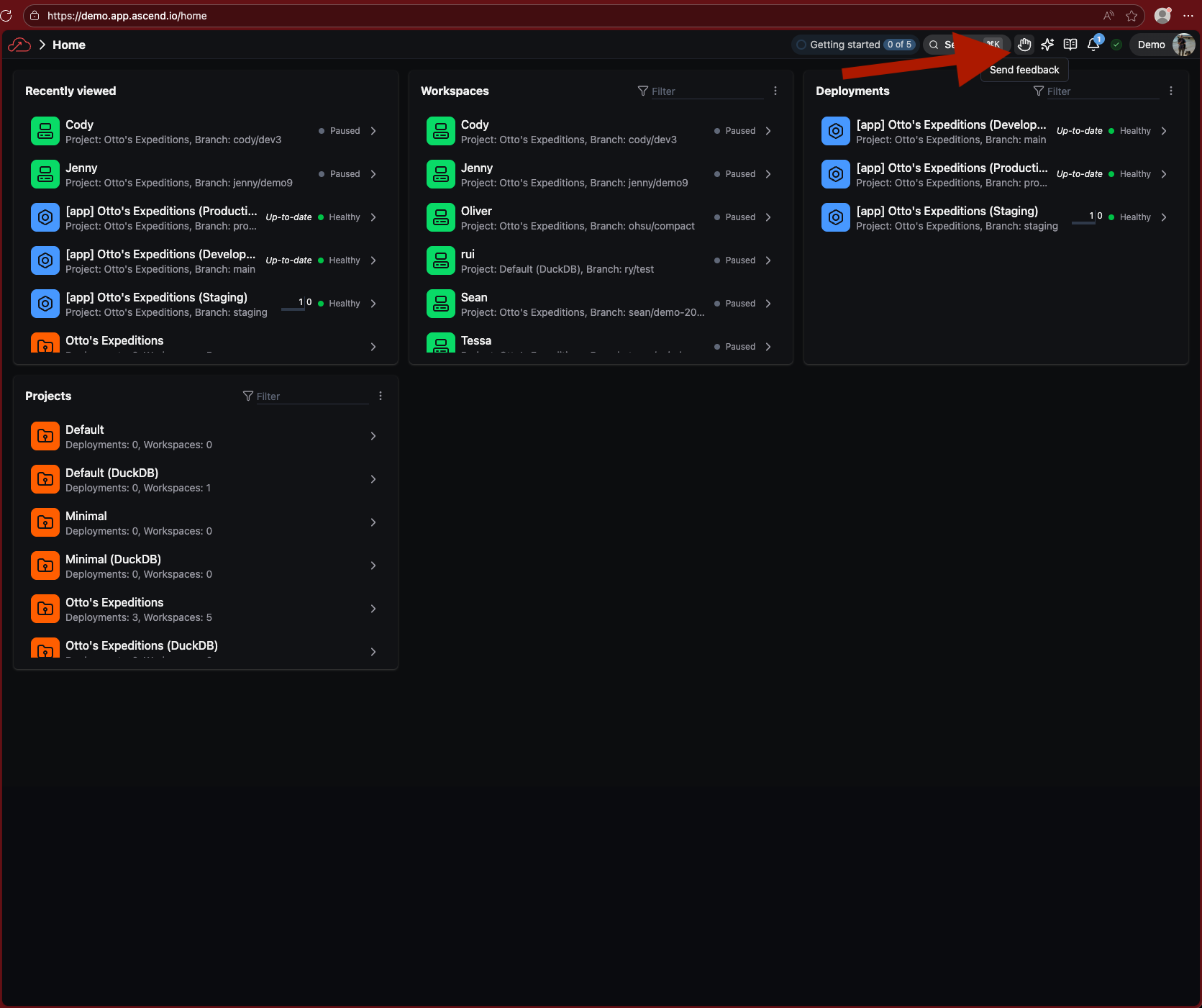
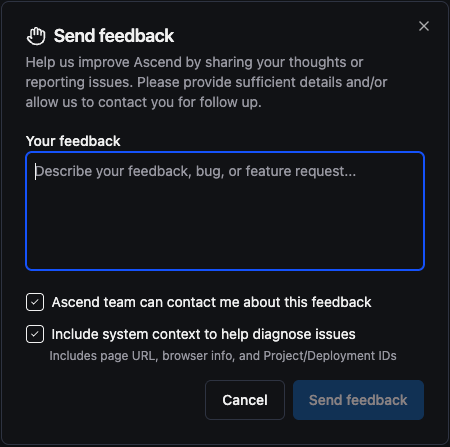
In-app product feedback: Submit feedback and feature requests directly from the app via the new feedback button in the header. Feedback routes to our product team for review.
-
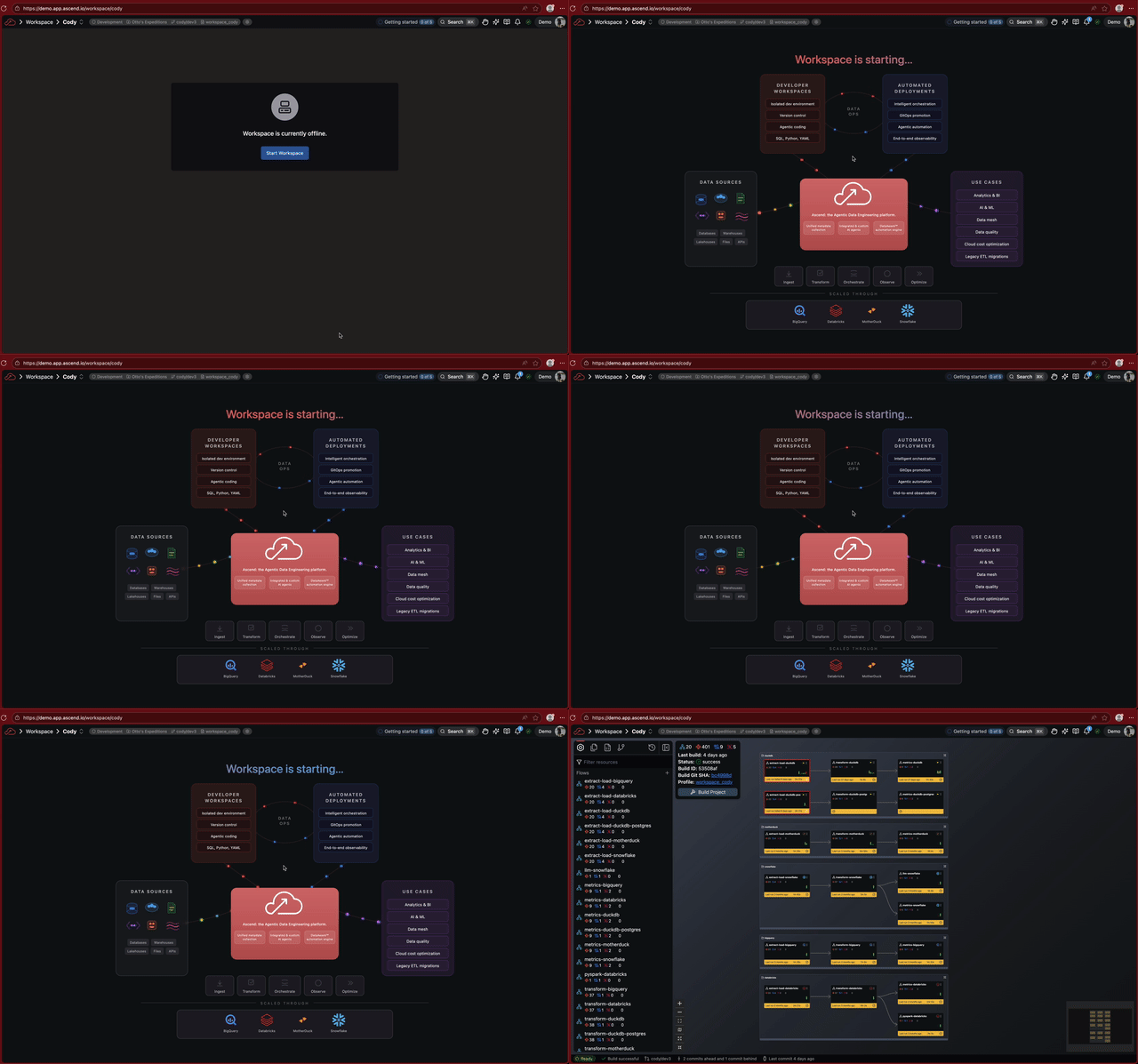
Animated Workspace startup: A new animated visualization plays while your Workspace is starting up.
Improvements
- Increased default Otto chat sidebar width for better usability
Bug fixes
- Fixed Worksheets triggering unnecessary builds when saved. Worksheets now save without interrupting your development workflow.
- Fixed DuckLake catalog exceptions during concurrent data operations. When using DuckDB as the DuckLake metadata catalog, concurrent INSERT operations could fail with catalog errors. All INSERT statements now properly acquire DDL locks when data inlining is enabled.
- Fixed errors in blob file conversion being silently swallowed. Exceptions during file-to-parquet conversion now properly propagate to the main thread and surface to users instead of causing indefinite hangs.
- Fixed the Run Flow button repeatedly showing loading state.
- Fixed intermittent PostgreSQL connection errors (
SSL connection has been closed unexpectedly) on long-idle Instances. Database connections now recycle after 30 minutes to prevent server-side timeouts.
2026-01-07
Features
Worksheets (Public Preview)
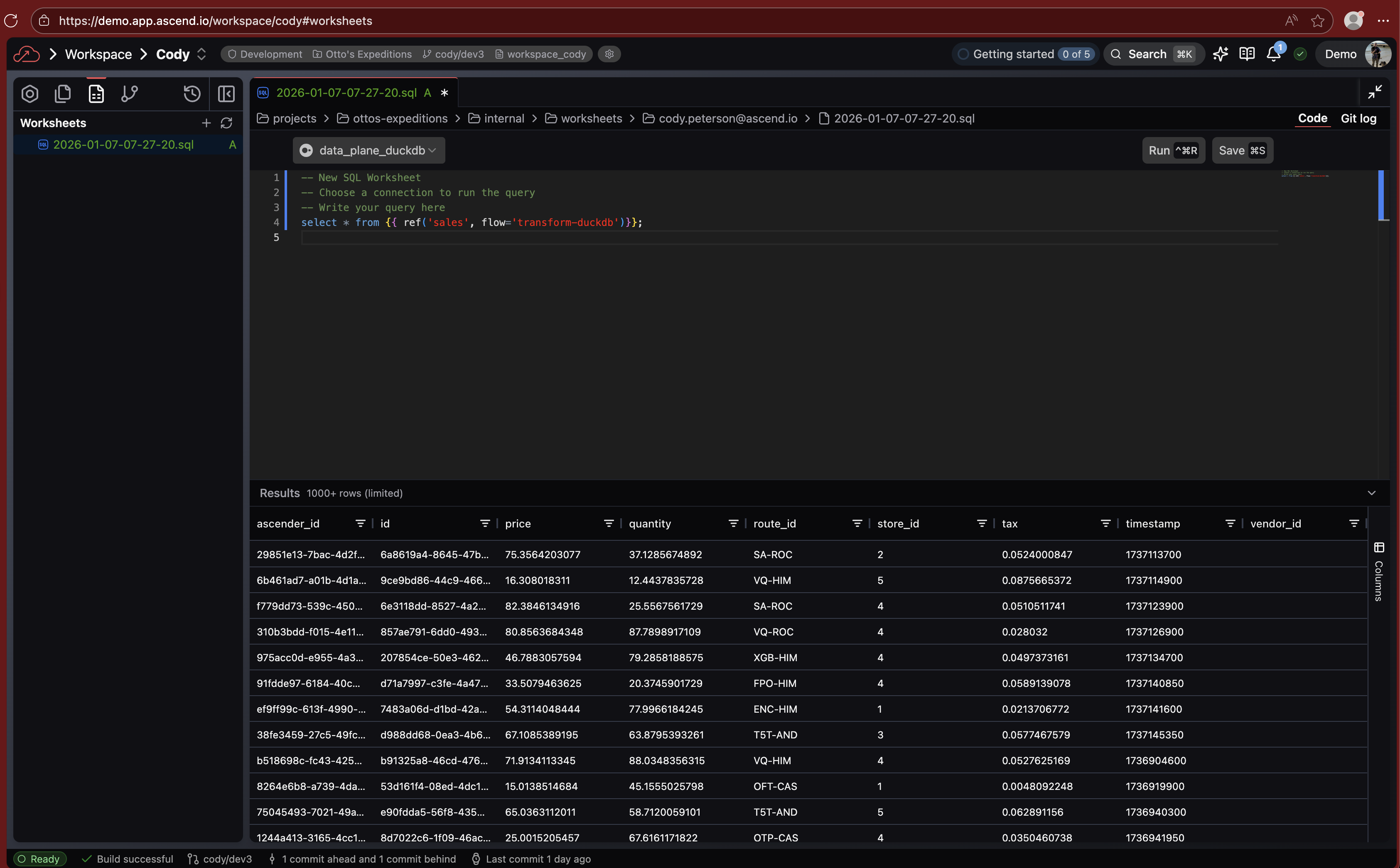
Run SQL queries directly in the Ascend UI with the new Worksheets editor. Position your cursor on any query and click Run to execute it, or select multiple queries to run them in sequence. A visual highlight bar shows exactly which queries will execute.
Worksheets are stored per-user in worksheets/<your-email>/ as regular .sql files you can rename and reorganize. Saving doesn't trigger builds. You can also run Worksheets in Deployments to query production data, though saving is disabled there.
Regex-based retry clauses
Define pattern-specific retry rules for Components with independent counters per error type:
retry_strategy:
  retry_clauses:
    - pattern: "503.*Service Unavailable"
      max_attempts: 10
    - pattern: "timeout"
      max_attempts: 3
Each pattern maintains its own retry count, so transient 503 errors won't exhaust your timeout retry budget.
Learn more about retry clauses →
Notification center
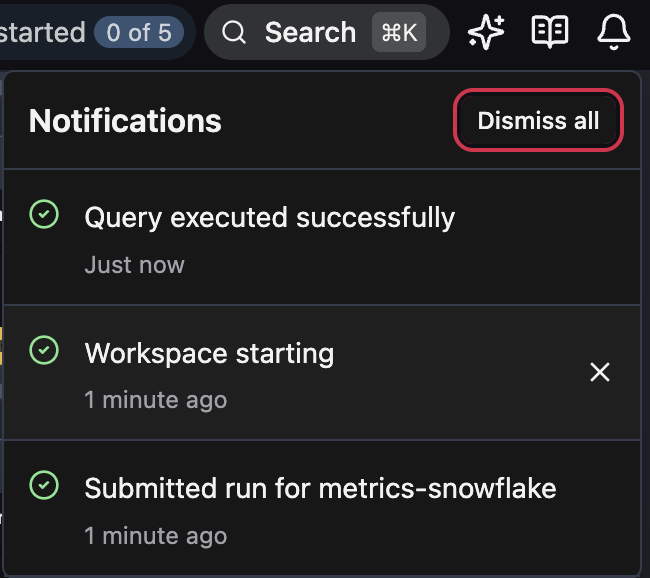
A new notification center in the navbar collects toast notifications with persistent history. Notifications are scoped to your user — click the bell icon to review your past notifications, dismiss individual items, or clear all. Toasts now dismiss 3x faster since you can always find them in the notification center.
Custom and high-memory runner sizes (Private Preview)
Configure CPU and memory for Workspaces, Flows, and Flow runs with new high-memory presets and custom size options. Contact your Ascend representative to enable this feature.
Improvements
- Improved responsiveness of real-time updates across the UI
- Preview operations are up to 3x faster due to caching
- Flow run history displays timestamps above each run column with detailed start/finish times in tooltip
- Flow run history adds logarithmic scale toggle for duration bars — useful when outlier runs distort the chart
- Run filter dropdowns include All/Clear buttons for bulk selection
Bug fixes
- Fixed Flow runs timing out during graceful shutdown when tasks continue running
- Fixed DuckLake data table compaction crashing with memory overflow on large tables
- Fixed S3 credentials expiring after 1 hour in Kubernetes environments
2026-01-01
Features
-
DuckLake table partitioning: Configure
partition_byin your DuckLake Data Plane options to partition tables by columns or expressions, enabling partition pruning for improved query performance.data_plane:duckdb:ducklake:partition_by:- regionSQL expressions are also supported:
data_plane:duckdb:ducklake:partition_by:- year(created_at)- month(created_at)
Improvements
-
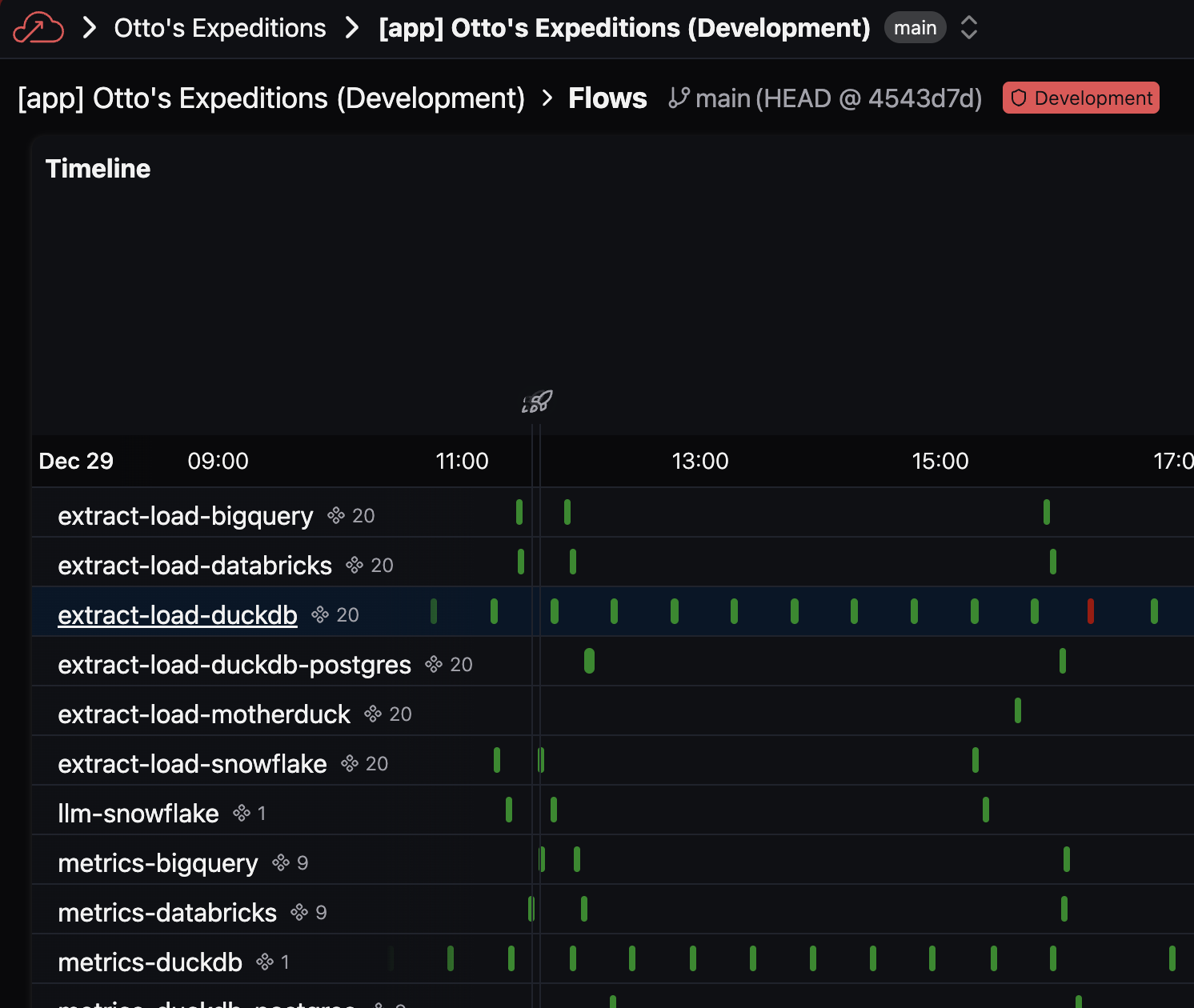
Flow names in the Deployment timeline view are now clickable, navigating directly to the Flow's run history.
Bug fixes
-
Fixed S3 authentication failures in long-running Flows. Credentials using IAM roles now automatically refresh, preventing failures after the 1-hour token expiration.
-
Fixed Flows with large partition counts (100K+) failing on Snowflake due to LOB size limits. Partition metadata is now stored in individual rows instead of aggregated arrays.
2025-12-25
Minor bug fixes and performance improvements.
2025-12-18
Features
-
Ascend-managed DuckLake without PostgreSQL (Public Preview): Ascend-managed DuckLake now supports a fully cloud storage-based architecture — no PostgreSQL required. Both metadata and data are stored in object storage, simplifying infrastructure and reducing overhead in a way that can improve performance for certain workloads. Configure with
$ascend_managed.duckdb_ducklake. See self-hosted DuckLake to bring your own storage. -
dbt project integration (Private Preview): Run dbt projects as Ascend Modules with full support for dbt models, tests, and builds via the new
dbtComponent type. -
Otto improvements:
- Extended thinking support for Claude models — enable advanced reasoning with configurable token budgets
- Improved response conciseness and parallel tool execution
Improvements
- DuckDB upgraded to 1.4.3 with MotherDuck compatibility.
Bug fixes
- Fixed identifier quoting across databases: database, schema, and table names starting with digits or containing special characters are now automatically quoted for Databricks, MS SQL Server, MySQL, Oracle, PostgreSQL, and Snowflake.
- Fixed incremental merge writes to PostgreSQL failing when the target table lacked a unique index. Ascend now automatically creates the required unique index on
unique_keycolumns when creating new tables. - Fixed Flow Graph freezing in an infinite loop when zooming to a node via the build panel.
- Fixed Flow Graph not updating to reflect row counts and Component statuses after data changes.
- Fixed branch selector crashing when typing an existing branch name instead of selecting it from the dropdown.
2025-12-11
Improvements
- Super Graph rendering is 85% faster. Lazy tooltip initialization, memoized build graph calculations, and pre-computed derived values significantly reduce DOM overhead and recomputation on large Projects.
- DuckLake table compaction now supports data tables in addition to metadata tables. Configure compaction thresholds per Component or globally via Profile defaults:
data_plane:duckdb:ducklake_data_table_compaction:small_file_record_count_limit: 100000small_file_count_threshold: 50small_file_ratio_threshold: 0.25
- Component defaults now support wildcards in the
flow_namefield, enabling global configuration across all Flows using regex patterns. - MCP tool calls now include explanations and descriptions for better visibility into Otto's actions.
- Deployment pages now load Flow runs beyond the initial 30-day window. Historical runs are fetched in the background and stored locally for faster subsequent access.
- DuckLake table compaction now includes helper tables created by Component store adapters, reducing fragmentation across all metadata tables.
2025-12-04
Features
- Otto can now navigate you through the Ascend UI. Ask Otto to open a specific file, go to a Deployment page, or view a Flow run, and it will take you there directly.
- OttoPilot is now available on the Dashboard. Get quick help, instance summaries, and suggested prompts without leaving the main view.
Bug fixes
- Fixed Microsoft SQL Server datetime predicates failing due to incorrect format. Datetime values are now formatted without timezone info and with millisecond precision.
- Fixed DuckLake compaction using wrong catalog name when catalog override is configured.
- Fixed Automation runs table only showing one run when multiple Automations triggered from the same event.
- Fixed Flow run links in email notifications using incorrect project identifier.
- Fixed Deployment Flow pages incorrectly redirecting to Super Graph view.
- Fixed Snowflake Connection URLs generated with incorrect case for account locator.
- Fixed SSH key display flickering when loading Repository settings.
- Fixed clicking Component in Deployment Flow run history opening the wrong file.
2025-11-27
Features
- Otto can fetch and analyze web content. Enable
web_accessto let Otto read documentation, API references, and other online resources to better assist with your work. - Read Components now support
strategy: fullfor native database connectors. Use this for small datasets or one-time loads that don't need partitioning:read:connection: my_databasestrategy: full
Improvements
- DuckLake now uses block-level row count statistics for dramatically faster output row calculations. Row counts that previously took minutes on large datasets are now near-instantaneous. Statistics are automatically computed during partition writes and backfilled for existing Components.
- Otto max turns handling improved. When approaching the turn limit (default 50), Otto receives a warning and gracefully summarizes progress instead of abruptly stopping.
- Workspace status on Project page now correctly reflects actual state (Online, Paused, etc.).
Bug fixes
- Fixed Snowflake Read Components dropping
_ascend_sourceand_ascend_ingested_atcolumns due to case sensitivity. Snowflake returns column names in uppercase, which now matches correctly. - Fixed Cmd+K quick search opening the wrong item when using keyboard navigation. The navigation index now correctly maps to visible items only.
- Fixed Component form overwriting extra YAML fields when switching between code and form views. Custom configuration options are now preserved.
2025-11-20
Features
- Otto now defaults to agent mode, providing more proactive, capable assistance. Otto can now autonomously plan, execute, and iterate on tasks without requiring explicit step-by-step prompts.
Improvements
- DuckLake metadata tables now automatically compact to prevent fragmentation. Tables with too many small files are detected and rewritten as single files during data maintenance.
- MotherDuck no longer uses DDL locking, allowing concurrent schema operations.
- Databricks Instance Store connections now handle invalid session handles gracefully with automatic reconnection. Added hourly connection pool recycling to prevent stale sessions.
- Blob storage list operations (S3, GCS, ABFS) now use native client prefix filtering instead of directory traversal, significantly improving performance for prefix-based listings.
- Table names with special characters (hyphens, spaces) now work correctly across all Data Planes. Quoting is applied automatically based on identifier validity.
- Default Workspace auto-snooze timeout increased from 20 to 30 minutes.
- Deployment Flows page loads faster with lazy timeline calculation, optimized date formatting, and a single shared popover instead of per-run popovers.
Bug fixes
- Fixed missing
_ascend_sourcecolumn in database-based Read Components. This regression caused schema mismatch errors when processing new data. - Fixed Incremental Read Components not respecting the
normalizesetting when nocolumnsconfig is specified. Also fixed Smart Table meta columns incorrectly appearing in output when usingcolumnsconfig. - Fixed Flow run listing not filtering by Profile and Project path for runtime queries.
2025-11-13
Features
- New OttoPilot experience with onboarding, welcome chat, and dashboard integration. Otto now provides a guided introduction for new users and quick access from the dashboard.
- DuckLake now supports
use_nightlyandforce_installoptions for extension management. Useuse_nightly: truefor latest development builds orforce_install: trueto reinstall the extension.
Improvements
- Otto improvements:
- Jinja templating is now disabled by default for custom rules and agents. Rules with
{{ }}syntax that aren't valid Jinja will no longer silently fail. Addjinja: trueto frontmatter to enable Jinja rendering.
- Jinja templating is now disabled by default for custom rules and agents. Rules with
- Smart Schema processing on DuckDB now uses temporary tables for intermediate operations, reducing write times by 33-47%.
- Flow run data loads faster with improved browser caching.
Bug fixes
- Otto fixes:
- Fixed Otto Automation failures when no explicit model was configured. Model selection now properly falls back through the priority chain (agent → defaults → Instance → provider).
- Fixed unable to disable Workspace auto-snooze in settings.
- Fixed MotherDuck logo not displaying in Explore tab.
2025-11-06
Bug fixes
- Fixed suspended Instance lockout controls to prevent content flashing before redirect.
2025-11-03
Features
- New Otto capabilities:
- Otto agent configuration now supports agent overrides, custom instructions, and configurable
max_turnssettings viaotto.yaml, including commit message generation with context integration.
- Otto agent configuration now supports agent overrides, custom instructions, and configurable
- Write Components now support full refresh operations for object storage (GCS, S3, ABFS), BigQuery, MySQL, Oracle, and PostgreSQL Connection types. Full refresh resets and rebuilds destination tables from scratch.
Improvements
- Snowflake authentication workflows updated to use key-pair authentication as password-based auth approaches deprecation.
Bug fixes
- Flow run errors now include the actual error message instead of generic timeout or segfault messages.
- Fixed DuckDB Connections to PostgreSQL metadata failing with
no password suppliederrors due to race conditions. Atomic file replacement ensures complete password files are written before reading. - Fixed Flow Components in subdirectories not displaying run history due to path resolution issues.
- Fixed Automation run error display formatting. Error messages now render with resize handles and copy buttons.
- Fixed editor focus behavior when saving files or accepting AI changes.
2025-10-27
Features
- New Otto capabilities:
- Otto now generates commit messages using Conventional Commits with type prefixes, scopes, and breaking change indicators.
- Otto agent system updated with improved context gathering that traces symbols and enhanced tool descriptions for error-prone operations like RegEx escaping.
- Otto displays inline file diffs consistently across all AI model providers.
- SQLFrame DataFrame support added across BigQuery, Snowflake, Databricks, and DuckDB Data Planes with Spark-like API and lazy evaluation.
- Project defaults now support Flow runner size configurations using RegEx patterns to match Flow names.
Improvements
- Added syntax highlighting for
.ascendignoreand other ignore files. - Snowflake authentication updated to use key pair authentication instead of deprecated password method.
- Increased MySQL connection pool size to handle higher concurrent loads, reducing timeout errors for Instance-to-cloud GRPC communications.
- Workspace pane automatically closes docked views when no tabs are present.
- Deployment names in merge menus now match labels used elsewhere in the UI.
- Tab loading logic enhanced with AbortController support for better resource management and error handling.
Bug fixes
- Otto fixes:
- Fixed patch parser to detect and correct malformed patch endings with extra
+characters. - Fixed Otto Chat title generation failing silently.
- Fixed commit message generation wrapping text in triple backticks or including commentary. Now outputs clean text without formatting artifacts.
- Fixed patch parser to detect and correct malformed patch endings with extra
- Fixed empty data tables being dropped during maintenance, breaking downstream Components. Tables referenced by committed partitions are now protected from deletion.
- Fixed table creation race conditions causing
Clustering Key has changederrors. Unified SQL generation with DDL locking ensures consistent behavior across Data Planes. - Fixed
Run Flowbutton text not updating when builds became out-of-date. - Fixed delete dialogs remaining open after successful deletions.
- Improved local storage error handling for corrupted data, quota exceeded errors, and other storage failures.
2025-10-20
Features
- New Otto capabilities:
- Otto communication style updated to remove filler phrases like "Certainly!" and "Of course!", with improved context gathering and tool descriptions for error-prone operations.
- Projects now support
.ascendignorefiles to exclude parts of your Project during development.- Profiles also support an
ignorefield for additional ignore patterns.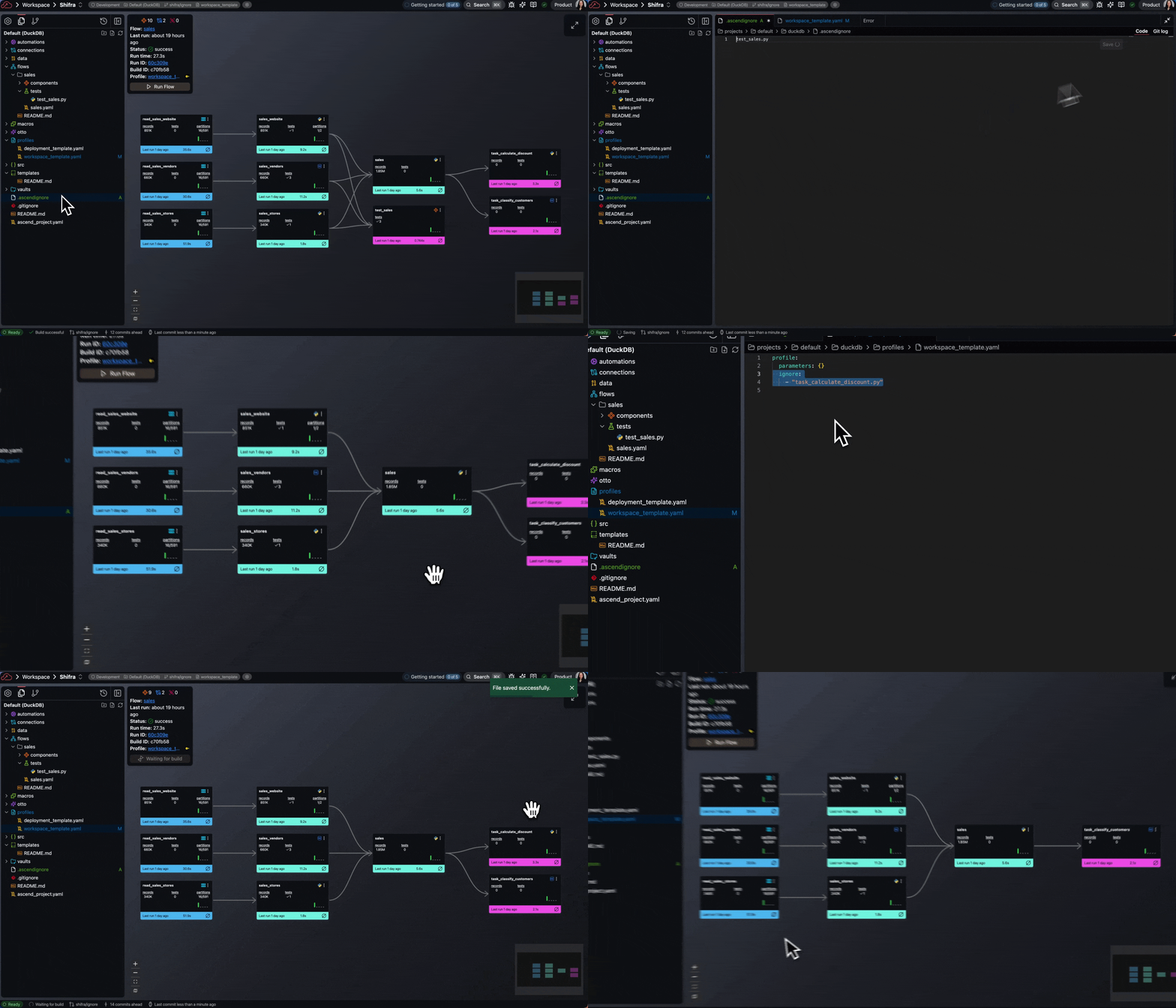
- Profiles also support an
Improvements
- Smart Schema support expanded:
- MySQL, Oracle, PostgreSQL, Microsoft SQL Server, BigQuery, Snowflake, and SFTP Read Components now support Smart Schema.
- Smart SQL Transforms, Smart Python Transforms, and Custom Python Transforms now support Smart Schema.
Bug fixes
- Fixed Component tests with
severity: warncausing hard failures. Test severity parsing now handles all configuration patterns correctly. - Fixed authorization checks hitting rate limits during rapid UI interactions. Authorization checks are now cached.
- Fixed polling being lost when switching browser tabs. Polling now pauses and resumes based on tab visibility.
- Fixed Project page crashing with
Cannot read properties of undefinederrors when refreshing. Page now handles empty states and removed unnecessary polling. - Fixed Workspace tours breaking when encountering auto-snoozed Workspaces. Tours now detect Workspace state and prompt users to start paused Workspaces.
2025-10-13
Features
- Added product overview and welcome video.
- Flow configurations now support Flow runner size overrides for custom resource allocation per Flow.
- Added nested subdirectories support for Flow and Component organization with collapsible directory views and summary statistics.
Improvements
- PostgreSQL authentication updated to use
pgpassfiles with automatic IAM token refresh. - Smart schema now supported on the Databricks Data Plane.
- DuckDB upgraded to version 1.4.1.
Bug fixes
- Fixed concurrent DuckDB operations causing segmentation faults due to missing thread locks. Added locking for DDL operations, query execution, and batch insertions.
- Fixed Smart Schema components with NULL partitioning versions failing during concurrent backfills with
Invalid partitioning version: Noneerrors. - Fixed DuckLake Connections on S3 failing after 1 hour due to expired AWS credentials. DuckLake now automatically refreshes credentials every hour.
- Fixed multiple UI memory leaks from Monaco editors, polling handlers, and window event listeners.
- Fixed paused Workspaces timing out when attempting to load Git status, causing 503 errors. Paused Workspaces now display a message instead of attempting to load Git status.

2025-10-06
Features
- Otto can now send automated email alerts with optional AI-powered explanations.
- Otto conversation limit increased from 25 to 50 maximum turns per request.
Improvements
- DuckDB now defaults to
max_combined_sql_statements=1when using DuckLake for better performance and resource utilization. Prevents memory issues and CPU usage inefficiencies. - Build performance improved by up to 67% for large projects through global Jinja2 template caching, file I/O optimization, and threading improvements.
- Otto Bedrock integration now supports prompt caching for Anthropic models, reducing costs and latency.
- Flow runner resource allocation now supports configurable size overrides for CPU, memory, and disk allocation per runner.
Bug fixes
- Fixed MCP tool call responses failing due to serialization issues with complex data types. JSON serialization now handles all data types correctly.
- Fixed segmentation fault in DuckLake by implementing safer check for partitioning version column existence.
2025-09-29
Features
- New Otto capabilities:
- Claude Sonnet 4.5 model is now the default LLM for Otto.
- Added guided tour for first-time users.
Improvements
- File upload memory management improved with single-threaded parquet conversion to prevent OOM crashes.
- DuckDB DDL operations now properly locked to prevent race conditions when multiple operations run with task-threads > 1.
- Documentation site redesigned with updated visual styling.
Bug fixes
- Fixed BigQuery Read Components with column casting throwing syntax errors due to missing fully qualified table names.
- Fixed BigQuery Flows with concurrent components writing to the same table failing with
Transaction is aborted due to concurrent updateerrors. Added automatic retry logic with exponential backoff. - Fixed
COALESCEexpressions in partitioned Data Plane operations causing SQL type inference issues. AllCOALESCEexpressions now use explicitCAST(NULL AS {type})syntax. - Fixed adding columns to existing Databricks tables failing with
[PARSE_SYNTAX_ERROR]errors. Column addition now works correctly across all Data Planes.
2025-09-22
Features
- New Otto capabilities:
- Otto now supports LLMs across providers with Instance-level model management settings. Configure under
AI & Models.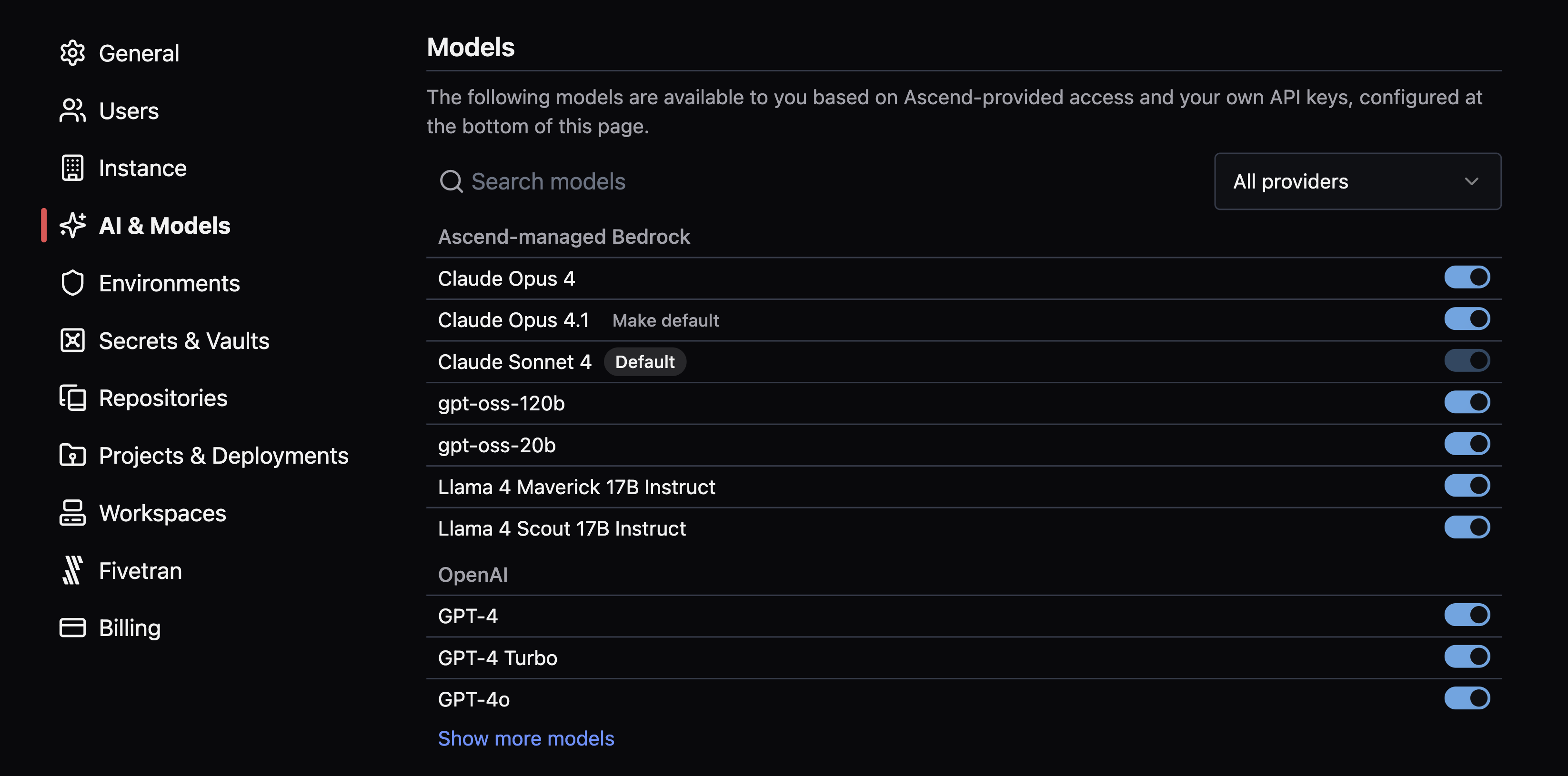
- Otto now works with Jinja macros, parameters, Automations, Tasks, and SSH Tunnels with updated rules and reduced token usage.
- Otto now supports LLMs across providers with Instance-level model management settings. Configure under
- Smart schema evolution is now the default schema change strategy for Read Components with object storage and Local File Connections on all Data Planes. Data partitions store their own schemas and reconcile type differences without copying data on schema changes.
- Existing Components continue to use the
fullstrategy. New Components default tosmartstrategy.
- Existing Components continue to use the
- Workspace auto-snooze automatically pauses inactive Workspaces after a configurable timeout (5-120 minutes), with detection of ongoing Flow runs to avoid interruption.
- Auto-snooze applies to all new Workspaces with a default timeout of 10 minutes.
Improvements
- Focus on a Component in the build panel to jump to its location in the Flow Graph, or on a Flow to jump to its location in the Super Graph.
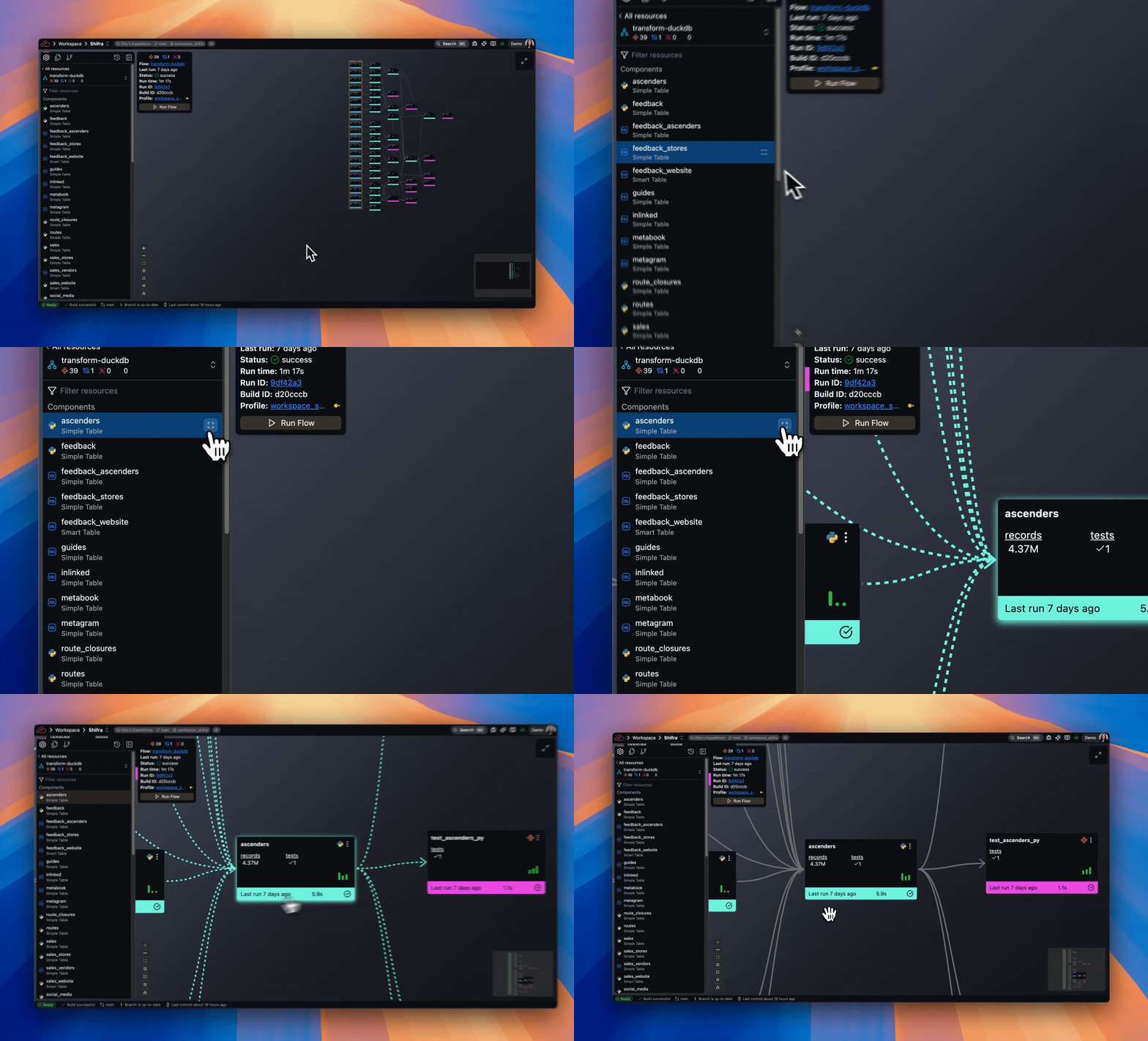
- Data Plane Connections now appear in Flow Connections list. Build info panel displays the number of Connections used in a Flow.

- Lists throughout Ascend Instance now sort alphabetically including Deployment, Project, Git branch, Profile, and Environment selectors.
Bug fixes
- PostgreSQL Read Components now preserve array and JSON column types instead of converting to VARCHAR. Added
arrays_as_jsonparameter for non-mappable array data. - Fixed incremental merger resets failing with malformed SQL syntax errors. Qualified table names now generate proper
DROPstatements across Data Planes.
2025-09-15
Breaking changes
- GCS and ABFS Connections now use more stable metadata fields (
md5Hash,crc32cfor GCS;content_md5,etagfor ABFS) for fingerprinting to prevent unnecessary re-ingests when storage tiers change. Requires re-ingesting existing data.
Improvements
- Deployment run pages now link directly to individual Flows instead of the Super Graph.
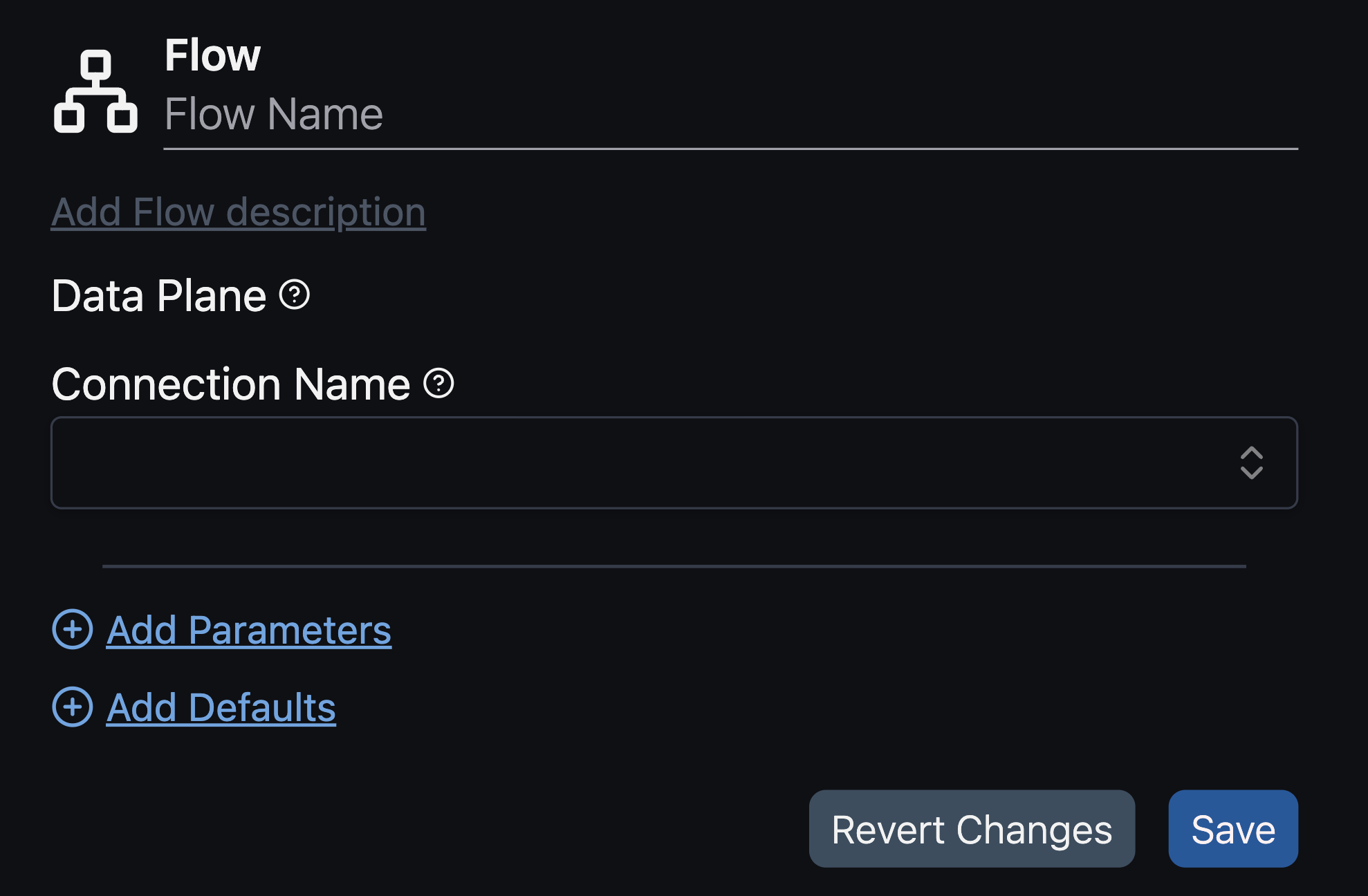
- Flex Code Flow creation forms streamlined to include only essential fields (name, description, Data Plane Connection, parameters, and defaults).
- BigQuery Data Plane replaced custom UDF logic with native
IFfunctions for better performance. - DuckLake on S3 now uses
httpfsas the default Connection method. - Added local file caching support for DuckLake with S3, GCS, and Azure Blob Storage.
Bug fixes
- Fixed DuckDB
SAFE_STRINGmacro creation failing in DuckLake environments with expression depth limit errors. Added Python UDF fallback. - Fixed long-running DuckLake jobs losing connection to metadata database.
- Fixed DuckDB-based ingestion not working with multiple PostgreSQL Components simultaneously.
2025-09-08
Features
- Added drag-and-drop file upload from computer to file tree.
Improvements
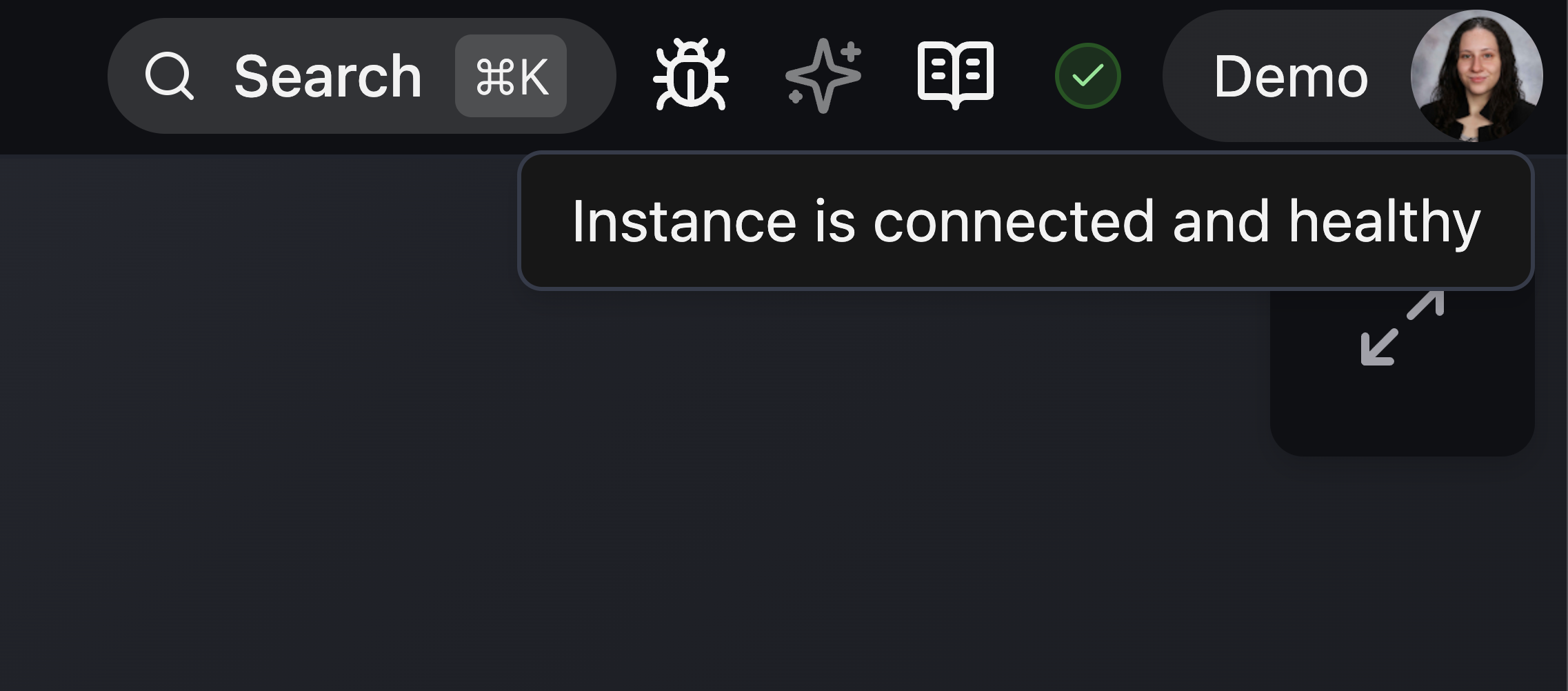
- Moved Instance status indicator to right side of header next to user menu.
Bug fixes
- Fixed
ascend view connection samplecommand failing withpyarrow.lib.ArrowInvaliderror when PostgreSQL tables contain range type columns. Command now converts range types to string representations. - Fixed incremental reads not honoring start values during backfill phases.
2025-09-01
Features
- MySQL and PostgreSQL databases hosted by AWS can now authenticate using AWS IAM roles.
Bug fixes
- Fixed Databricks SQL connector compatibility issue due to renamed API. System now handles both API versions with fallback logic.
- Fixed
partition_templatefunctionality in blob Write Components. Datetime templates are now properly parsed and interpolated.
2025-08-25
Features
-
New Otto capabilities: Otto can now be used as an Action in Automations to respond to Flow events, analyze data patterns, and execute actions across multiple platforms:
automation: name: otto-notifications enabled: true triggers: events:
- sql_filter: json_extract_string(event, '$.data.flow') = 'transform-demo'
types:
- FlowRunError
- FlowRunSuccess
actions:
-
type: run_otto name: run-otto config: prompt: >-
Instructions
You are being invoked at the end of a flow run. Your job is to assess changes in flow run behavior, and send a Slack message to keep other users updated. You cannot ask for help or clarification; you must do this end-to-end on your own based on your own judgement. Your last action should always be to post a message to Slack.
Flow run analysis rules
Analyze flow success / failure by fetching the maximum number of flow runs.
-
If the flow run was a success and the previous flow run was also a success, send a funny message congratulating the team on another smooth run.
-
If the flow run was a success and the previous flow run was not, send an exciting and congratulatory messages celebrating the flow is now fixed, and congratulating whichever user did the fixing (check git history).
-
If the flow run was a failure and the previous flow run was also a failure, send a sad message imploring somebody to fix it.
-
If the flow run was a failure and the previous flow run was not, send a big alert message. You should try to identify who broke the flow, and even @ mention them if you can. You should also try to analyze the changes and suggest fixes if possible.
Additionally, you should make heavy use of git history and file reading calls to help track down details that may be relevant.
Slack message and notification
At the end of your analysis, you must post a message to Slack in the appropriate channel.
Your slack post message should:
- include a link to the flow run: https://[runtime.link_url]/flows/[flow_name]/[run_name]
- be formatted for Slack rendering, which is different than markdown
- when @ mentioning users, look up their profile so you can reference their actual id
-
- Otto introduces custom rules for adding special instructions for chat interactions.
- Otto now connects to external MCP servers via configuration files.
- Otto's configuration now uses
otto.yamlfile in a dedicatedottodirectory for centralized agent and MCP server configuration.
Improvements
- Write Components for blob storage (ABFS, GCS, S3) now support configurable chunk size using the
part_file_rowsfield to optimize performance and avoid OOM errors:
component:
  write:
    connection: write_s3
    input:
      name: my_component
      flow: my_flow
    s3:
      path: /some_other_dir/
      formatter: json
    part_file_rows: 1000
Bug fixes
- Fixed database Read Components (PostgreSQL, MySQL, Microsoft SQL Server, Oracle) converting SQL null values to the literal string 'None' when loading query results into PyArrow arrays. Null values are now properly preserved.
- This change affects all pipelines using database Read Components across all Data Planes.
- If you previously added cleanup steps to handle 'None' string values, you can remove them.
2025-06-23
Features
- New Otto capabilities: Otto now renders tool calls, showing which tools are called, their inputs, and outputs.
Improvements
- Write Components now support improved performance for large uploads through chunked blob storage:
- Paths ending with a filename (e.g.,
.parquet) → single file output (unchanged) - Paths ending with a trailing slash (
/) → chunked output withpart_<chunkid>format - Partition writes now always produce chunked output files
- Paths ending with a filename (e.g.,
- Flows can now be run from Deployment history pages when on the latest Project build.
Bug fixes
- Fixed action failures in Automations interrupting the entire workflow. Individual action failures are now isolated.
2025-06-16
Features
- Private Python package repositories now supported for AWS CodeArtifact and GCP Artifact Registry via
pyproject.tomlfiles. See how-to guide for setup instructions.
Improvements
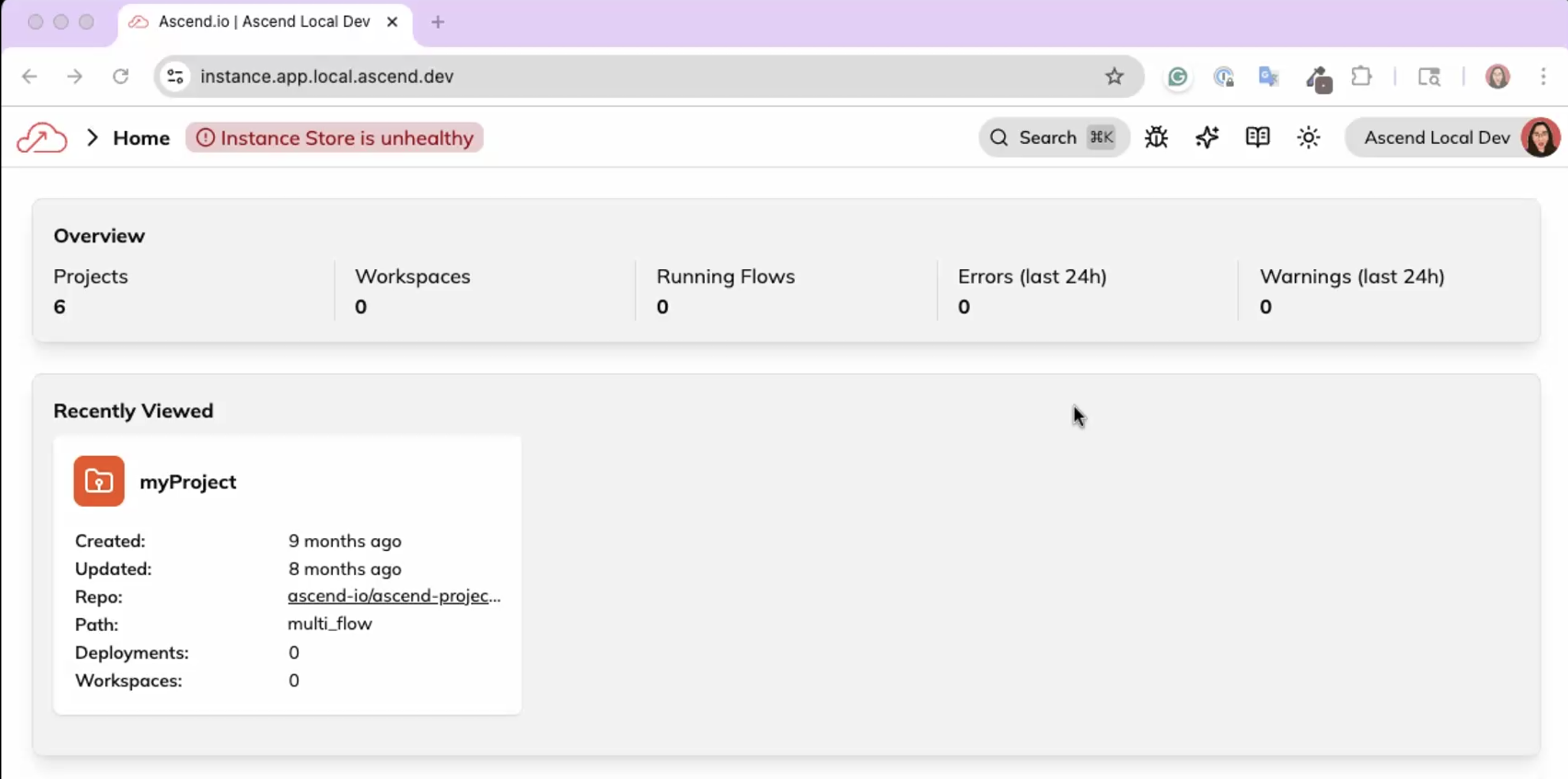
- Instance header now displays error when Instance backend is unhealthy:
- Improved error messages for OOM process terminations:
Flow runner process for my_flow/fr-01977f3c-845b-72a1-b225-4327835f8434 exited with code -9.
Exit code -9 usually means the kernel's Out-Of-Memory (OOM) killer terminated the process after it exceeded its memory limit.
Consider increasing the runner size or optimizing the workflow's memory usage.
Bug fixes
- Fixed build history calendar days outside the current month not being selectable.
2025-06-09
Bug fixes
- Fixed Workspace settings not clearing old run history when switching Projects.
- Fixed status bar on Explore tab showing outdated information. Now updates in real-time.
- Fixed Workspace settings URLs not navigating to correct pages.
- Fixed Workspace or Deployment size settings not being respected.
- Improved "Flow runner not found" error messages to include detailed pod status information (OOM, timeout, unexpected states, API/connection errors).
- Fixed Flow runners staying active when idle. Now automatically shut down when not in use.
- Fixed Git operations hanging indefinitely when repositories became unresponsive. Now timeout automatically.
- Fixed Application parameters not working with Incremental logic in SQL transforms.
- Fixed partition filter and partition value analyzers interfering with each other during concurrent backfills. Now run independently.
- Fixed text parser crashing when given string file paths in Arrow and pandas reads.
2025-06-02
Features
- Otto can now provide SQL linting information via SQLFluff.
- Command-K search now supports navigation to settings pages.
Improvements
- Improved UI rendering of errors and warnings.
- Added Polars DataFrame support as input/output format in Python transforms.
- Parquet processing now normalizes column names to avoid case conflicts.
- Automation sensors now support timezone configuration.
- Automation failed status now shown when there is no associated Flow run.
Bug fixes
- Fixed column case sensitivity handling for Python Read Components on Snowflake.
- Fixed Profile name, Project UUID, and path not being persisted into build info.
- Fixed Transformations with upstream Incremental Read Components not resolving to correct table name.
- Improved Unicode and emoji handling.
- Fixed Component/Run state carrying over from current builds into historical ones.
- Added timezone information to timestamps across the UI.
- Fixed record columns not being resizable in Explore view.
2025-05-26
Features
- Added syntax highlighting for INI, TOML, and SQLFluff files.
- AWS Managed Vault now supported as Instance or Environment Vault.
- New Otto capabilities:
- Otto can now validate YAML files and test Connections.
- Otto automatically configures tools based on environment context (Workspace vs. Deployment).
Improvements
- Streamlined Python interfaces in Simple Applications for easier migration from regular Flows.
- Added copy button to Connection test errors.
Bug fixes
- Fixed multi-line comment parsing in SQL and SQL Jinja files.
- Fixed compatibility issues between
.yamland.ymlfile extensions. - Optimized error stack traces to be more concise.
- Fixed PostgreSQL Connections SSL verification and empty port configuration handling.
- Fixed clickable error links in Component cards within Deployments.
- Fixed arrow keys not working when renaming files.
2025-05-19
Features
- New Otto capabilities:
- Project file health checks including YAML linting and fixes
- Connection testing and issue resolution
- Connection listing and exploration
- Flow and Component execution, monitoring, and troubleshooting
- Components can now have non-data graph dependencies to any other Component.
- Added Git status indicators to file browser and tab bar.
- Retry logic now configurable for all Component types.
- Added pause-all functionality for Deployment Automations.
Improvements
- Runs table column widths now remember user preferences.
- Improved Automation form workflow.
- Component build errors now provide more specific information about which Component failed.
Bug fixes
- Fixed Databricks Connections not reconnecting when encountering "Database Invalid session" errors.
- Fixed file refresh not updating cached and open files.
- Fixed repo save button state not reflecting current state correctly.
- Improved branch listing operation reliability.
- Fixed zooming on individual nodes in expanded Application Component graph tab.
- Fixed Databricks Connections catalog reference handling.
- Fixed UI state consistency issues during rapid save, build, and run operations.
- Fixed MySQL Connections with SSL=True throwing exceptions.
- Fixed table references not using full names in merge operations.
- Improved detection and handling of build failures caused by OOM conditions.
- Fixed empty files causing Project builds to fail.